




Academy
MT4 vs MT5 for Funded Forex Traders

•
Sep 30th, 2026
•
9 min
read


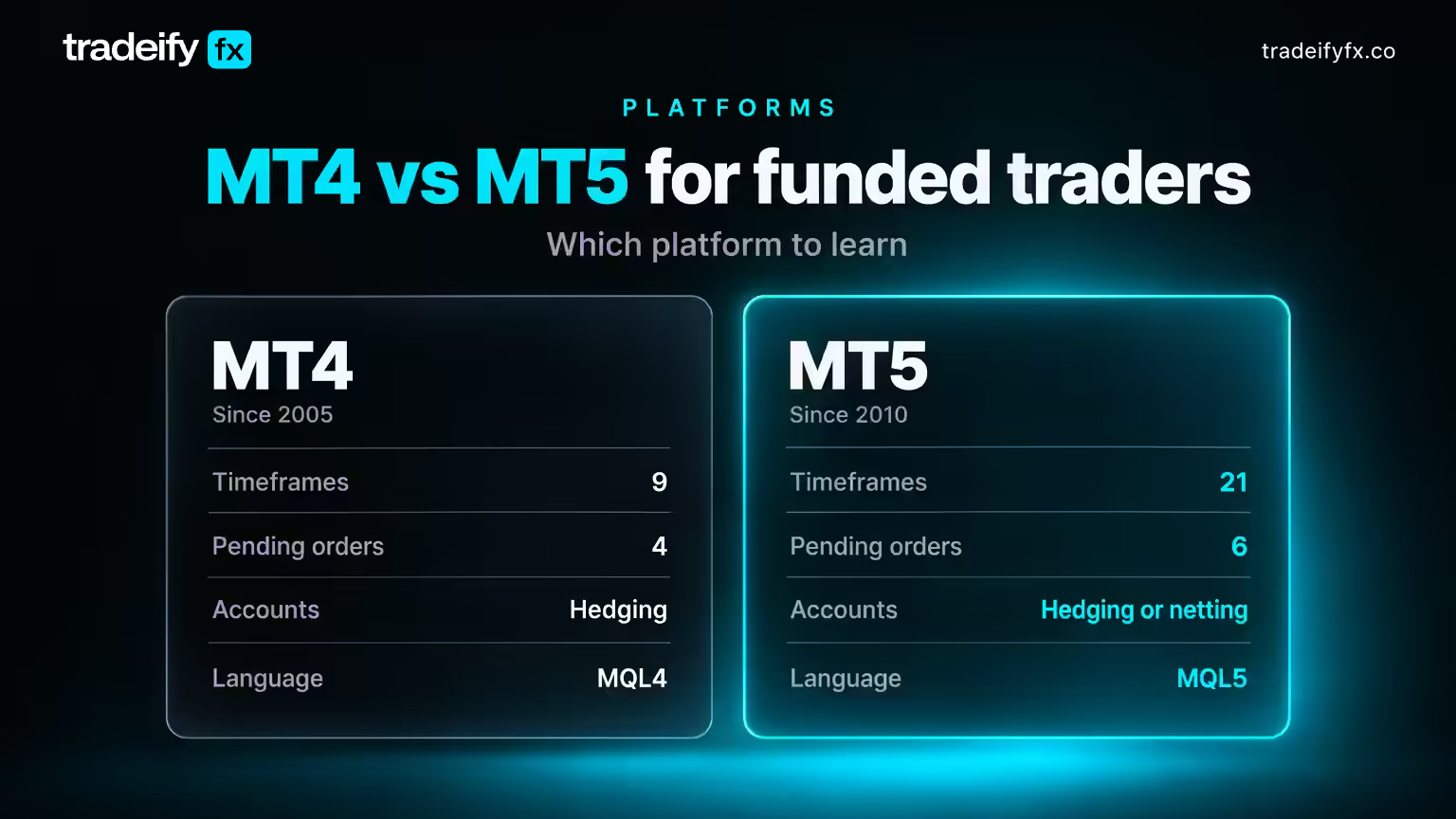
TL;DR: MT4 (2005) is forex-only with 9 timeframes, 4 pending order types (buy limit, sell limit, buy stop, sell stop), hedging-only accounts, MQL4, no depth of market, and no economic calendar. MT5 (2010) is multi-asset with 21 timeframes, 6 pending order types (adds buy stop limit and sell stop limit), hedging or netting, object-oriented MQL5, built-in depth of market and economic calendar, a multi-currency strategy tester, and CFDs on forex, metals, energies, indices, stocks, and futures. MetaQuotes no longer issues new MT4 licenses, most prop firms run evaluations on MT5 only, and MQL4 tools do not run on MT5 without a rewrite. For a trader whose funded account ends on a daily loss limit or max drawdown breach, MT5 is the platform to learn.
You are about to pay for an evaluation, and the firm gives you one platform choice or none at all. If you spent two years on MT4, the real question is not "which platform is better." It is "what could a platform difference cost me on an account that ends the moment I break a rule."
Retail comparisons weigh chart aesthetics. A funded trader has to weigh whether a netting account will silently close a hedge, and whether a news release they did not see will push them through a daily loss limit.
What MT4 and MT5 Are
MetaTrader 4 was released by MetaQuotes in 2005 for one job: spot forex through a broker's server. It runs indicators and Expert Advisors (EAs) written in MQL4, and for more than a decade it was the default at most forex brokers.
MetaTrader 5 followed in 2010 as a multi-asset platform built to connect to exchanges as well as forex liquidity, which is why it carries a depth of market window, exchange-style order types, and a netting mode. MetaQuotes has focused development on MT5 since and stopped issuing new MT4 licenses to brokers.
MT4 still works where it is already installed, but when a prop firm says "MT5 only," that is often the only license it can get.
Trade Forex Without Limits
Tradeify is built for forex traders who want clarity, consistency, and speed — not surprises.
Join Discord
.svg)

MT4 vs MT5 Feature Comparison Table
| Feature | MT4 | MT5 |
|---|---|---|
| Release year | 2005 | 2010 |
| Chart timeframes | 9 (M1 to MN) | 21 (adds M2, M3, M4, M6, M10, M12, M20, H2, H3, H6, H8, H12) |
| Order types | Market plus pending | Market plus pending, with fill policies (Fill or Kill, Immediate or Cancel, Return) |
| Pending order types | 4 (buy limit, sell limit, buy stop, sell stop) | 6 (adds buy stop limit, sell stop limit) |
| Hedging vs netting | Hedging only | Hedging or netting, set by the broker or prop firm |
| Language | MQL4 (procedural) | MQL5 (object-oriented) |
| Strategy tester | Single currency, single thread | Multi-currency, multi-threaded, real ticks |
| Depth of market | Not built in | Built-in DOM window |
| Economic calendar | Not built in | Built-in, with impact ratings |
| Multi-asset | Forex CFDs (some brokers add metals and indices) | Forex, metals, energies, indices, stocks, futures, crypto CFDs |
| Built-in indicators | 30 | 38 |
| New broker licenses | No longer issued | Actively issued |
Indicator counts vary by build. The structural differences (pending orders, netting, MQL5, DOM, calendar) are the ones that change how you trade.
Key MT4 vs MT5 Differences on a Funded Account
The useful question is which extras protect an account with a daily loss limit and a max drawdown.
Pending Orders and Fill Policies on MT5
MT4 gives you four pending orders. If you want to buy a breakout only after price pulls back into the broken level, no single order does that.
MT5 adds buy stop limit and sell stop limit. Example: EUR/USD is at 1.0850, resistance sits at 1.0870, and your plan is to buy the retest at 1.0862 only after the break. A buy stop limit with the stop at 1.0871 and the limit at 1.0862 does that without you watching the candle. The alternative, market-buying the breakout candle at 1.0875 out of fear of missing it, is the chase that becomes a 20-pip loss on 0.5 lots (about 100 USD at 5 USD per pip) before the retest happens.
Fill policies work in the other direction. A Fill or Kill order fills completely or not at all, so you do not end up with 0.3 lots of a 0.5-lot idea during a fast release, then add the rest at a worse price.
Hedging vs Netting on MT5
MT4 is hedging only: long 0.5 lots and short 0.3 lots of GBP/USD at once, as two tickets. MT5 supports hedging or netting. A netting account keeps one position per symbol: long 0.5, sell 0.3, and you are now long 0.2.
Here is where funded traders get caught. A trader may have used a hedge on MT4 to "lock in" a loss while waiting for direction. On a netting account that order closes part of the position instead, realizing the loss immediately against the daily loss limit. Check the account mode before you place a single order. Most MT4 hedging habits were ways of avoiding a stop anyway.
MQL4 vs MQL5 on MT5
MQL4 code does not run on MT5. A custom indicator or EA written for MT4 needs a rewrite in MQL5, which is object-oriented and stricter about types.
The upside is the tester. MT5 backtests across multiple symbols with real tick data. For a trader deciding whether an EA can stay inside a max drawdown over a meaningful sample, that is the receipt MT4 could never give you.
The failure mode: over-optimization. A curve-fit EA showing 2% max drawdown in the tester can still breach a funded limit in its first week. Test out-of-sample before trusting the number. Then read the firm's rules before running any EA on an evaluation or funded account: many allow only EAs you wrote yourself, can ask for the source code, and ban off-the-shelf EAs and third-party signal bots outright.
MT4 Pros and Cons
MT4 pros:
- Familiar to almost every forex trader, with tutorials everywhere.
- The largest library of free indicators, scripts, and EAs.
- Lighter on system resources, which helps on cheap VPS plans.
- Simple layout with few settings to break.
MT4 cons:
- Four pending order types and no fill policies.
- Single-currency strategy tester.
- No built-in calendar, so news risk depends on a browser tab you may forget.
- No depth of market.
- No new licenses from MetaQuotes, so fewer prop firms offer it each year.
Learning a platform your next firm may not support is study time you cannot get back.
MT5 Pros and Cons
MT5 pros:
- 21 timeframes, including H2, H6, H8, and H12 for session-based structure.
- Six pending order types plus fill policies for precise entries.
- Built-in economic calendar and depth of market.
- Multi-currency, real-tick strategy tester.
- One terminal for forex, metals, indices, and energies.
- Actively developed and the platform most new prop firms license.
MT5 cons:
- MQL4 tools do not transfer.
- More menus and account modes, so more places for a beginner to misconfigure something.
- Netting mode surprises MT4 traders.
- Smaller free indicator library.
None of these are reasons to avoid MT5. They are reasons to spend a week on a demo before an evaluation clock starts.
The conversation happens live
Blog comments are too slow for forex. Join 12,000+ traders in our Discord to discuss this article, share charts, and debate the market in real time.

Usability and Mobile Apps on MT4 and MT5
Side by side, the two platforms look nearly identical, and an MT4 trader can place a market order on MT5 within minutes.
Both have iOS and Android apps with charts, indicators, and full order entry. Neither runs EAs. MT5 mobile includes the calendar and the extra order types; MT4 mobile does not. For a funded trader, the phone is for managing an open position, not opening new ones. Lunch-break entries from a phone are how a daily loss limit gets breached on a setup you would never take at the screen.
Platform Cost, Brokers, and Demo Accounts
Both platforms are free to download from MetaQuotes or from any broker or prop firm that licenses them. The broker or firm pays for the server license. That is also why you cannot trade on MT5 without a broker: the terminal is a client, and without a login Market Watch stays empty.
A demo is where you find out which account mode the firm uses and how stop limit orders behave. An evaluation is also simulated, but it comes with a fee, a rule set, and a clock. Spending fee money to learn where the menus are is an avoidable mistake.
Which Platform Should a Funded Trader Learn
Learn MT5. Here is the reasoning, not just the verdict.
Observation: MetaQuotes stopped licensing MT4 to new brokers, and most new forex prop firms run evaluations on MT5 only. Interpretation: MT4 is becoming a legacy skill. Condition: if your target firm is MT5 only, MT4 knowledge is worth nothing there beyond the shared layout. Action: build your whole process on MT5, including order types, templates, and automation. Invalidation: if you already hold a funded MT4 account and have no plans to move, keep trading it, but build your next process on MT5 in parallel.
The order types are the second reason. A daily loss limit punishes impatience, and stop limit orders plus Fill or Kill remove two common ways impatience becomes a mis-priced entry. The calendar is the third. A trader who holds 1.0 lot through a rate decision they did not see coming can lose the day's allowance in one candle.
MT4 is still the right answer only if you rely on an MQL4 tool with no MQL5 equivalent and your firm supports MT4. That is a shrinking group.
MT4 vs MT5 FAQ
Is MT4 good for beginners?
Yes for the learning curve, no for the long term. MT4 has fewer settings, one account mode, and plenty of tutorials. But a beginner learning MT4 today is learning a platform fewer prop firms offer each year. If the goal is a funded forex account, start on MT5 and accept a slightly longer first week.
Is MetaTrader 5 good for beginners?
Yes, if you set it up deliberately. The layout and basics match MT4, and the extra features can stay closed until needed. Three day-one checks: hedging or netting, where the calendar tab is, and how stop limit orders trigger on a demo.
Can I use MT5 without a broker?
You can install it, but you cannot trade or see live prices. MT5 needs a broker's or prop firm's server for quotes and execution. A free demo or a prop-firm evaluation login is required either way.
Is MetaTrader 5 legal in the USA?
Yes. The software is legal, and some CFTC-regulated US forex brokers offer MetaTrader to US clients. Availability depends on the provider, not the platform: many MT5-based funded forex programs do not accept US residents. Check a firm's restricted-country list before paying any fee.
Next Step Before Your MT5 Evaluation
Before the clock starts, open an MT5 demo and run this checklist. Confirm the account mode. Place one buy stop limit and one sell stop limit on EUR/USD and watch how they trigger. Open the calendar tab and note the next two high-impact releases. Then trade your plan for five sessions and journal every order that did not behave the way you expected on MT4. Those entries are the differences that would cost you on a funded account.
Our Tradeify FX evaluation and funded accounts run on MT5, with CFDs on foreign exchange, metals, energies, indices, and digital assets, and rewards are calculated from simulated performance under our Trading Rules. Hedging within a single account is allowed on our accounts, as MT5 supports natively, so you can hold long and short positions on the same instrument; hedging across accounts or with other traders is not. Automated EAs are permitted only if you built them yourself, and we may ask for the source file and an explanation of the strategy at any time. Off-the-shelf algo EAs, shared bots, and third-party signal execution are not permitted, while trade-manager EAs that size and manage trades you choose to take are allowed. Our programs are not available to US residents or residents of other restricted countries.
Trading leveraged CFDs carries a high level of risk and is not suitable for everyone. Evaluation and funded accounts are simulated, and results are not indicative of live-market results. Nothing here guarantees passing an evaluation, receiving funding, earning a profit, or receiving a payout.

Keep Reading
See all
Academy
Sep 30th, 2026
Pips, Pipettes, and Lot Sizes Explained for Funded Forex Accounts

Academy
Sep 30th, 2026
Forex Slippage and Gaps Can End a Funded Account

Academy
Sep 30th, 2026